

GLOBE Clouds
Why Do Scientists Study Clouds?
Clouds affect Earth's overall temperature and play a major role in controlling the planet's long-term climate. Scientists need accurate data on clouds to understand their impact over time. Satellites only see the tops of clouds, while we see the bottoms—together, we get a much more complete picture of clouds and their effects in the atmosphere.
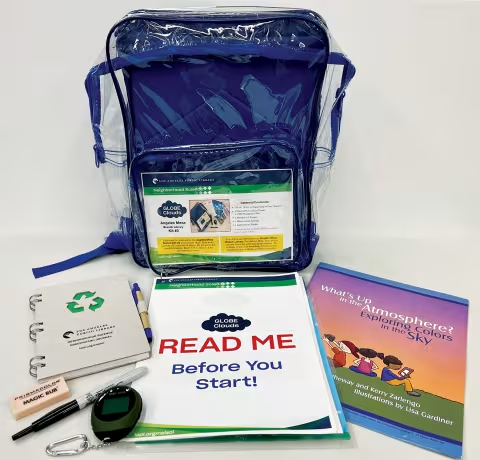
What's in the Kit?
- 1 book: What is Happening to Our Climate?
- 1 instructions packet
- 1 mini GPS location finder
- 1 USB charging cable
- 1 sharpie
- 1 eraser
- 1 observation journal
- Safety rules
How to Help Scientists Collect Data?
Step 1
Turn on internet/Wi-Fi connectivity and GPS tracker of your smart device (i.e., smartphone or tablet). You can also use Google Maps or download a free GPS-Map app for your iOS Apple or Android device.
Step 2
Go to the GLOBE Observer’s Clouds Protocol page for an overview and tutorial.
Step 3
Download and launch the GLOBE Observer app.
Step 4
Follow the instructions in the app to create an account and sign in. Enter GLID5WFS for the referral code to join Team LAPL (Los Angeles Public Library).
Useful Tip
If you prefer to submit your observation data anonymously without creating a GLOBE account, go to Observation Anonymous, and select GLOBE Observer: Clouds to access the observation form. Complete all fields on the form then select Submit.
Step 5
Read the message on screen and tap Training Complete.
Step 6
Choose Allow or Not Allow for push notifications from the GLOBE Observer app.
Step 7
Read through the Privacy and Terms of Use and select I Agree to proceed.
Step 8
On the GLOBE Observer app’s Home screen, tap Clouds protocol.
Step 9
For first-time users, read the introduction by tapping Next. At the end of the introduction message, check the box Do not show this again, if you do not want to go through the introduction screens again the next time you sign in.
Step 10
On the GLOBE Clouds protocol home page, tap New Cloud Observation and follow the instructions on screen to record your observations.
Step 11
If you are comfortable identifying clouds by type at different heights, tap Manual Cloud Identification to continue.
If you are not comfortable with identifying clouds by type at different heights on your own, tap Guided Cloud Identification Wizard on the Choose a Mode screen. The wizard tool will guide you through the identification process.
Step 12
When reaching the Observation Complete screen, tap Send All Cloud Data Now to submit your observations or tap Review/Edit Observations if you’d like to make changes to your observation data.
Step 13
Be sure to put all equipment, supplies, and the instruction packet back into the bag and return the kit to the library so someone else can contribute.
Helpful Tips
- You can tap the key (key icon) button at the bottom of the screen to bring up the Cloud Identification Chart to help you identify the clouds and sky you are observing (you will lose the data you have entered up to that point and have to re-enter the observation data later).
- Tap the question (?) button if you need more observation assistance (you will lose what you have input up to that point and have to re-enter the observation data later).
- Tap the home button (house icon) on the bottom left of the screen to go back to the GLOBE Observer’s Home screen and select Clouds protocol to restart your observation.
GLOBE Clouds Curriculum
Lessons
Lessons are short moments of NGSS (Next Generation Science Standards)- aligned direct instruction, delivered in video or slide format, that inform participants of the knowledge necessary to participate in Citizen Science activities.
Activities
Activities frame moments of Citizen Science participation through hands-on exploration and creation, including using the Neighborhood Science kits to collect data.